|
1.
SabrePoint POS:
Download and
trial (Trial limit is 50 starts). You may trash the SabrePoint
POS dummy
databases supplied and enter your own real data, which will be
retained should you decide to register.
-
Multi-users
please note: Only one download is required; it can be installed and
trialed on multiple computers.
-
Note that
physical disks are not normally shipped ... users should backup the
downloaded file for future use.
-
Note: SP Barcode (Trial version) is included in the SabrePoint
POS installation, and is automatically registered free upon
registration of SabrePoint POS.
2.
[SP Barcode only]: Download
and trial. There is no limit to the number of trial runs, but
SP Barcode is crippled to 10 barcode impressions per start
unless registered.
-
Note: Do not download SP Barcode separately if you are going
to/have installed SabrePoint POS, as SP Barcode (Trial
version) is included in the SabrePoint POS installation, and
is automatically registered free upon registration of
SabrePoint POS.
3. If you decide not
to purchase, that's fine. Do nothing more.
4. But if
you would like to register, go to our
Secure Ordering
page and select the item you wish to
purchase. We have bundled SabrePoint POS into a
single-user system as well as several multi-user
packs. All systems are expandable in future by
purchasing additional multi-user expansion licenses.
SP Barcode and the optional Transaction Manager can
also be purchased from the Secure Orders page.
Payments
may be made by Credit
Card (Visa, EuroCard/MasterCard, American Express, Diners'
Club), Telegraphic Transfer, Check or Cash.
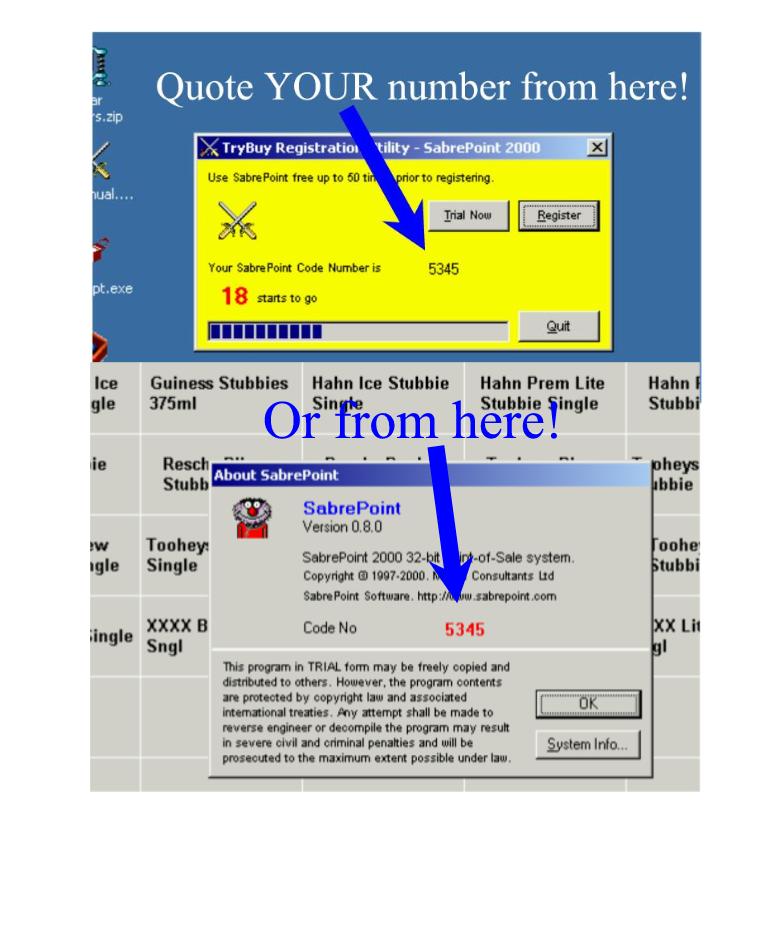
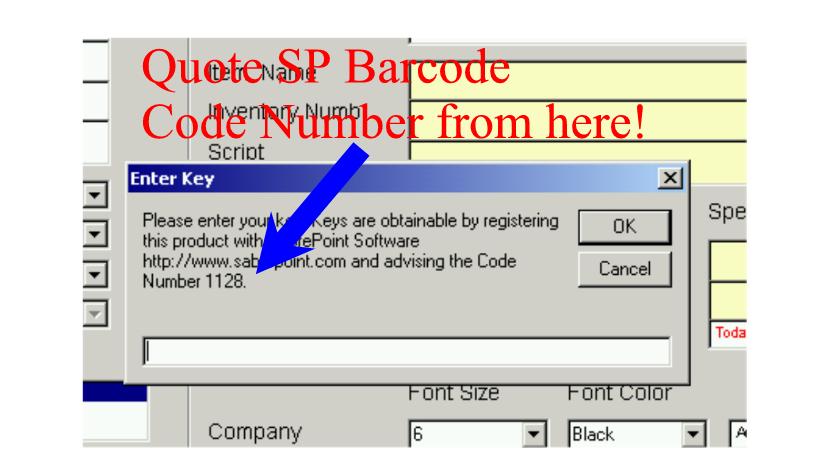
IMPORTANT! We require your program
Code Number in order to generate your password. Normally you will provide this
in the space provided on your order form, but may be emailed to us any time
thereafter (as is often done with multi-user pack purchases).
Click here for help with SabrePoint Code Numbers
Click here for help
with SP Barcode Code Numbers
5.
Your payment is authorised, following which your password is despatched within 48 hours; often sooner. Type your
password into the yellow TryBuy box ... your program
is now registered and available for ongoing use. All data added during the trial
is retained unless you decide otherwise.
6. We provide free upgrades and
ongoing email support free for up to three years following purchase.
Please email us if you
have any question you can't find answers for on the
Customer Assistance page.
|